

This page is designed to support you in your link tutor role – here you’ll find answers to common Abyasa questions, processes, and links to guidance.
Should you require further assistance or have questions not addressed here in relation to Abyasa, mentoring or mentor training, please do not hesitate to contact the Edge Hill University Mentoring Team at [email protected].
If you require support with link tutor allocation on InPlace, please contact [email protected].
Click below to jump to a section:
Abyasa supporting documents and useful links:
- Link Tutor Abyasa guidance 2025
- Mentor Abyasa guidance 2025
- Trainee Abyasa guidance 2025
- Abyasa link
- Link to the Mentor Abyasa FAQ page
- Welcome email template with invite to QA1 – link tutors to mentors
- Welcome email template to trainees (Primary Only)
Link tutor supporting documents:
QA step by step guides:
Supportive Strategies
Supporting trainees with Dyslexia
Supporting trainees with Dyspraxia
Supporting trainees with Dyscalculia
Supporting International trainees
Supporting trainees with ADHD
Supporting trainees with ASD
Inclusion Support for Link Tutors
Planning expectations – 5-11
Principles of planning – 5-11
Early Years 3-7 QA date tables:
PGCE
UG Intro Y1
UG Dev Y2
UG Con Y3
Primary 5-11 QA date tables:
PGCE
UG Intro Y1
UG Dev Y2
UG Con Y3
UG SB Part Time Intro Y1
UG SB Part Time Dev Y3
UG SB Part Time Con Y4
Abyasa – my mentor needs a login
If a mentor has not received a login to Abyasa, follow the below steps.
As link tutor you have permission to add/delete and amend mentor records on InPlace. Abyasa pulls login information from InPlace so InPlace needs to be correct.
Follow the steps in this guidance to ensure your mentor is attached to the correct trainee placement on InPlace.
To note: Once you have made changes on InPlace, Abyasa logins and mentor audits will be sent out within the following 2 working days.
If you require support with the guidance, please email [email protected] with a suitable date/time for a Teams call to go through the guidance and answer any questions you may have.
Abyasa Guidance
- Link tutor Abyasa guidance 2025
- Mentor Abyasa guidance 2025
- Trainee Abyasa guidance 2025
- Abyasa link
To note: If after following the above Abyasa guidance, you have a query regarding Abyasa, please email [email protected] with the trainees name, mentors name and your issue. The more detail you can provide the quicker your query is likely to be resolved.
Where are the professional practice documents/resources on Abyasa?
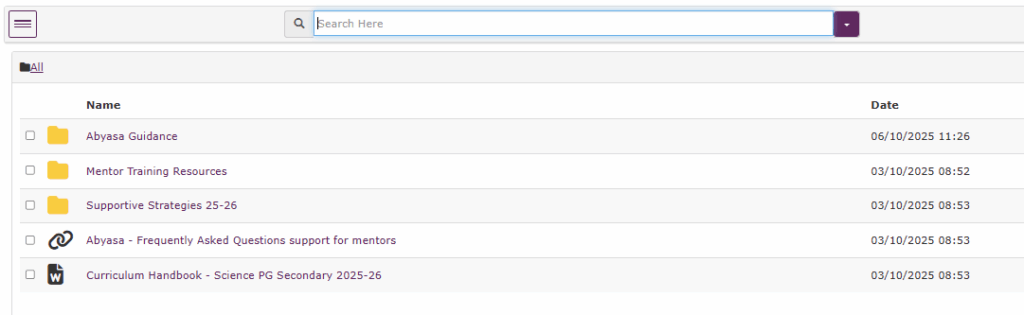
The supporting documents include the relevant Professional Practice Handbook, exemplars, phase slides and other links and documents that mentors will require during their trainees professional practice.
1) From the My Trainee’s section, click to view the trainees portfolio that you wish to view the supporting documents for

2) Navigate to the Mentor Resources tab

These resources are relevant to this specific trainees course. If you are link tutor/mentoring multiple trainees in different years, remember to navigate to the portfolio of the trainee that you wish to view resources for.
Example of what the resource area looks like below:
Link tutor or mentor can’t see a trainee on Abyasa
1) For link tutors and mentors: Navigate to View All in your My Trainee’s section. Here you will be able to view a full list of all the trainees we have you allocated as a mentor/link tutor for.
If the trainee is not listed in the View All list, please move to step 2.
2) Abyasa pulls information from InPlace so InPlace needs to be correct.
For mentors: Please check and add the mentor to the trainees placement on InPlace. Follow the steps in this guidance. If a mentor is already added, changes in Abyasa will reflect in 2 working days.
For link tutors: The Primary Support Team add link tutors to InPlace (contact [email protected]) however you can also add yourself:
To add yourself as a link tutor to a trainees placement on InPlace, please follow the same steps as adding a mentor but under Supervisor Type, choose staff:

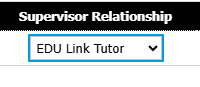
Search your name and press select. Choose EDU link tutor under supervisor relationship and press Add Supervisors.
You will be able to see the trainees portfolios on Abyasa within 2 working days after changing InPlace.
Refer/Defer trainees timelines
Refer/defer trainee timelines do not have all of WDS’s populated automatically as not all trainees require all weeks, they may only be repeating 2-3 weeks of placement for example.
The relevant WDS weeks that are required can be added to the timeline by accessing the start menu.

Please refer mentors to Page 16 in the Mentor Abyasa guidance 2025.
For Refer/defer mentor training: A recording and/or slides of the phase specific briefings from last year are available in the Mentor Resources tab on your mentors Abyasa. Please direct them to view this training.
Mentor Training requirements for 2025-26 and where to access
| Type of mentor | Required mentor training for 2025-26 |
|---|---|
| New to EHU Mentor – has not mentored with another ITT provider in 2024-25 | – Initial mentor audit – Phase training online webinar – New to Mentoring at EHU online module |
| New to EHU Mentor – has mentored with another ITT provider in 2024-25 | – Initial mentor audit – Phase training online webinar – EHU Refresher online module |
| Mentored at EHU in 2024-25 | – View phase slides on Abyasa or can choose to attend online webinar – EHU Refresher online module – Optional initial mentor audit update |
Where mentors will access this training:
This below information and all relevant links are sent directly to mentors from FoEMentoring.
- Initial mentor audit – link is sent to mentors directly from FoEMentoring
- Phase training online webinar – available to book here or if missed, can view the slides in the Mentor Resources tab on Abyasa.
- New to Mentoring at EHU online module – available on Abyasa Mentor Training portal
- EHU Refresher online module – available on Abyasa Mentor Training portal
For Refer/defer mentor training: A recording and/or slides of the phase specific briefings from last year are available in the Mentor Resources tab on your mentors Abyasa. Please direct them to view this training.
Please refer mentors/school leads to our Mentor Development 2025-26 page for a full breakdown.
Mentor training grant funding information is available here.
How to check a mentors training on Abyasa Pro Report
Link Tutors, PPQL/Course Leads and Programme Tutors will be able to run reports on their attached mentors mentor training progress via Abyasa’s Pro Report.
Guidance: How to run Pro Report to show your mentors mentor training progress.
To note: Ignore the percentage complete column in the report and use Complete/Draft in the Completion Phase column as the signifier that the training is completed.
Back to top of page
Mentor details not on InPlace
The Mentoring Team email school main contacts 2-3 weeks* before placement start dates to request mentor details.
*This is dependant on when placements become confirmed on InPlace but this is checked daily so schools will be contacted continuously until a mentor name is received.
This is followed up via phone and email until a mentor name is received. Once a mentor name is given, this is added to InPlace the same day.
Abyasa logins and trainee portfolio access will be updated within 2 working days after InPlace is updated. Mentor training information will also be sent during this time.
If you know a mentors details and they are missing or have changed, please follow the steps in: My mentor needs an Abyasa login.
Guidance on claiming expenses through Selenity
Guidance for claiming expenses through Selenity
Video Guidance: